TL;DR: 다국어 번역을 사용하지 않을거라면 읽을 필요가 없습니다.
기획자 없이 개발하다 보니 번역 키 관리가 엉망이 되어버린 상황에서, 수작업 노가다를 자동화로 바꾼 경험을 공유합니다. 한국어 텍스트를 키로 활용하는 전략, i18next-parser로 missing key 자동 등록, JSON ↔ Excel 동기화 스크립트 구축까지 — 번역 파일 관리를 개발자답게 해결한 과정을 담았습니다.
TL;DR
기획자 없이 개발하다 보니 번역 키 관리가 엉망이 되어버린 상황에서, 수작업 노가다를 자동화로 바꾼 경험을 공유합니다. 한국어 텍스트를 키로 활용하는 전략, i18next-parser로 missing key 자동 등록, JSON ↔ Excel 동기화 스크립트 구축까지 — 번역 파일 관리를 개발자답게 해결한 과정을 담았습니다.

Sangwoo Yang
@IGhost-P
<div>
  <h1>관리자 화면</h1>
  <span>이 화면은 관리자를 위한 화면 입니다</span>
  <span>* 관리자 권한이 없다면 접근 할 수 없습니다 <span>
  <p>{{ user.name}}</p>
</div>
위와 같은 코드가 있다, 위와 같은 코드에 다국어 번역을 적용하려 한다면, 어떤 방식을 사용할것인가?
구글 번역 API를 보내 구현한다.
각 문자열을 객체화 시키고 국가 코드에 따라 string 값을 내보낸다.
로 생각 할 수 있다.
‘구글 번역 API’를 사용하면 편하긴 하겠지만, 원하는 번역 텍스트가 아닐 수 도 있고, API 요청이 많아짐에 따라서 비용 청구가 발생 할 수 있다.
그렇다면 선택 할 수 있는 부분은 ‘각 문자열을 객체화하고 국가 코드에 따라 string’값을 내보내는 방법인데,
이 방식에 대해서 알아 보고자 한다. 이 글은 이 i18n을 도입하면서 발생했던 문제점과 그걸 개선한 내용이다.
i18n은 무엇인가?
국제화 i18n (“internationalization” 부터 유래, 20자로 이루어진 단어))는 제품이나 서비스를 모든 대상 문화에 쉽게 적용할 수 있도록 하는 모범 사례입니다.
즉 서비스에 다국어 번역을 지원하는걸 i18n이라 부른다.
어떻게 국가 코드를 파악하고 객체로 넣을까?
MDN 문서에 따르면 브라우저 API인 navigator 을 사용해, 현재 사용자가 사용하고 있는 국가 코드를 파악 할 수 있다.
navigator.language; // "en-US"
navigator.languages; // ["en-US", "zh-CN", "ja-JP"]
또는
let locale = selectCodeFunc()이런식으로 원하는 사용자에게 원하는 국가 코드를 전달 할 수 있다.
const translation = {
	"ko" : {
	  "admin_screen_title": "관리자 화면",
	  "admin_screen_description": "이 화면은 관리자를 위한 화면입니다",
	  "admin_screen_restriction": "* 관리자 권한이 없다면 접근할 수 없습니다"
	},
	"en" : {
	  "admin_screen_title": "Admin Screen",
	  "admin_screen_description": "This screen is for administrators",
	  "admin_screen_restriction": "* Access restricted to users without admin rights"
	}
}

// using
const local = "ko";
const t = (key) => translations[locale][key] || key;
이런식으로 객체를 사용하면 될것이다. 물론 커링의 방식을 이용 할 수 도 있다.
물론, 이런것들을 사용하기 편하게 해주는 여러 라이브러리들이 존재한다.
i18next: https://www.i18next.com/
React Intl: https://formatjs.io/docs/react-intl/
Vue I18n: https://kazupon.github.io/vue-i18n/
ngx-translate (Angular): https://github.com/ngx-translate/core
Polyglot.js: https://github.com/airbnb/polyglot.js
Next.js i18n Routing: https://nextjs.org/docs/advanced-features/i18n-routing
FormatJS: https://formatjs.io/
LinguiJS: https://lingui.dev/
방식에 차이가 있겠지만 대부분 국가 코드별 json을 이용해 rapping된 문자열을 key값으로 사용한다는것이다.
여기까지는 i18n 적용법 에 대한 내용이고 이걸 어떻게 관리할까?
일단 내 상황에 대해서 간단하게 설명해보자면
다국어 지원을 생각하고 있지 않았어서 문자열을 그냥 하드코딩으로 들어가 있음 (이미 2000자 정도..?)
기획자가 없어서 각 문자열에 대한 key를 정의하지 않고 있음
번역을 담당해주는 팀에게는 엑셀 파일로 정리해서 전달해줘야함
맨처음 I18n을 도입할때는 사수가 일단 넣어 야한다고 했기에 기능 개발과 동시에 i18n을 적용했다.
i18n 일단 적용하기
어떻게 적용했냐면..
모든 파일을 보면서 정적 문자열을 찾는다.
찾은 문자열을 엑셀 파일에 넣고, $t나 t로 해당 Key를 감싼다. (번역을 도와주는 함수 $t, t)
그리고 ko.json, en.json 파일을 만들어서 해당 key값을 넣는다.
그림으로 표현하자면,
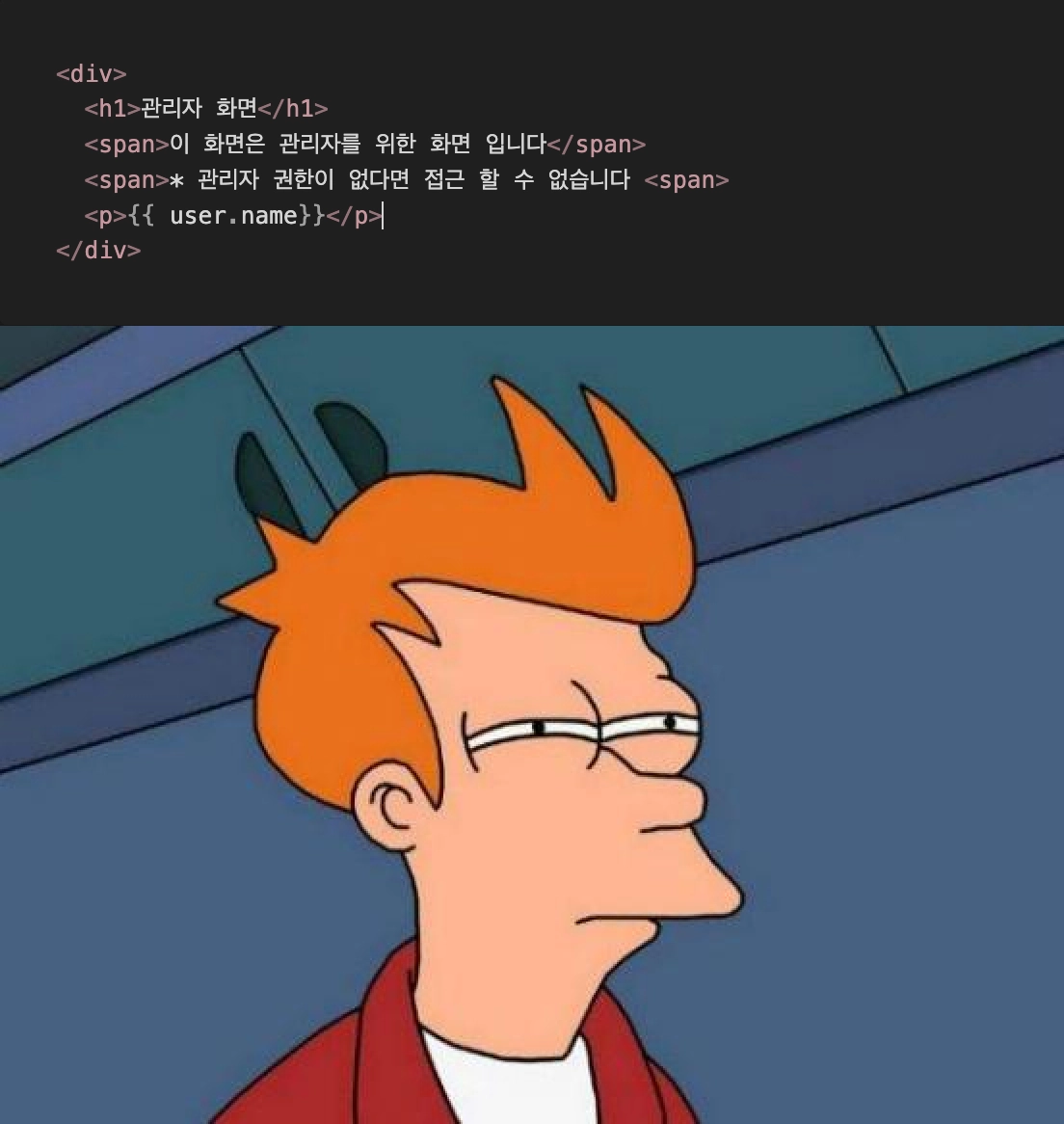
일단 한번 째려보고
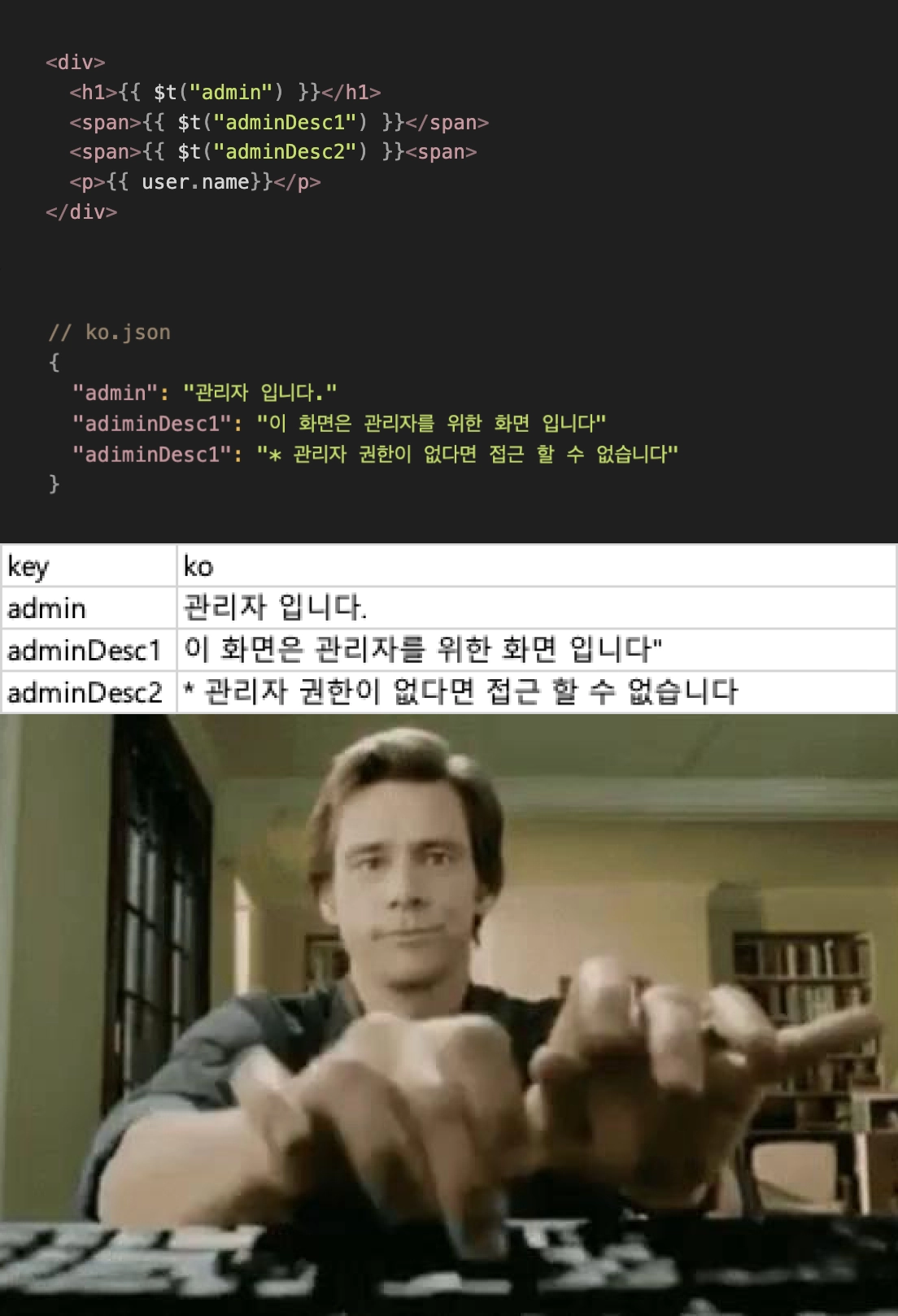
일일이 타이핑 하기
상당한 노가다가 들어가긴하지만, 딱히 다른 방법이 있나..? 라는 생각을 했었다. 그래서 눈이 좀 아팠긴 했지만.. 아무튼 잘 마무리를 했었다.
생각없이 코딩한 그대 그 무게를 견뎌라
점차 시간이 지나고, 그만큼 다시 번역해야 할 텍스트들이 늘어갔다.
하지만 저번처럼 단순 노가다를 하면 되는게 아닐까? 라는 생각이 있어 별로 신경쓰지 않았다..(해야할 다른 일도 많았기에..)
그러고 약 3개월뒤 미번역 문자열들이 너무 많아 다국어 번역 작업에 들어갔다. 지난번과 똑같이 추가하려고 했으나,
고려하지 못한게 몇가지 있다.
눈으로 찾아서 번역을 했기에, 지난번에도 찾지 못한 하드 string을 찾기 어려움
직접 JSON, Excel에 추가하는 것이기 때문에, 파일에 중복된 값, 미사용 값이 있을 수 도 있음.
각 번역 파일이 분리되어있기에, ko.json, en.json. jp.json에 서로 key값이 올바르게 적용 되었는지 확신하기 어려움
번역이 비동기적으로 이루어지기 때문에 현재 번역이 완료된 파일과 번역이 필요한 문자열을 다시 맞춰줘야하는 문제가 생김
즉 첫번째 번역은 파일의 버전 관리와 동기화가 필요 없었겠지만.. n번째 번역이 되는 순간 부터는 버전 관리의 필요성이 생기는것이다.
그래서 기존 방식의 문제점을 확실하게 생각해보았다.
기획자가 없기에 key값을 미리 만들지 않음
key값을 JSON에 하나하나 등록해야함
번역 파일의 원천 데이터는 JSON이지만, 해당 원천 데이터를 정리 할 수 있는 수단이 없음
원천데이터인 JSON과 Excel이 동기화가 되어있지 않음 (적용 파일, 번역 파일 따로 관리)
이러한 문제점들을 하나씩 해결해 보면 좋은 프로세스가 만들어 질 것이라 생각했다. 그리고 구글의 GMS 프로세스를 통해서 번역 프로세스가 올바른 프로세스인지 검증까지 해보고자 했다.
1. key값을 미리 만들지 않게 만들자
기획자가 없기에 ( 본인이 화면 기획을 하면서 화면을 개발을 한다 ) 텍스트나 문구를 먼저 개발하는 경우가 많다보니, key값을 먼저 정하기도 애매하고, 내가 입력한 문구가 제대로 입력된게 맞나..? 싶은 경우가 있다.
🤔 만약 key값을 미리 만든다면?
<div>
  <h1>{{ $t("admin") }}</h1>
  <span>{{ $t("adminDesc1") }}</span>
  <span>{{ $t("adminDesc2") }}<span>
  <p>{{ user.name}}</p>
</div>
일단 key값을 뭘로 해야하는지.. 고민하는 시간이 든다.
해당 문구가 뭐였는지 알 수 가 없음 ( 물론 vsc의 i18n-ally 확장 프로그램을 사용한다면 괜찮겠지만, 이것또한 번역 json을 불러오는데 시간이 걸린다)
번역을 하다보면 key값을 바꿔야하는 경우가 있다, 가령 영문으로는 cutoff ⇒ disrupt가 조금 더 올바르다던지
한국어를 일단 key값으로 사용하자
<div>
  <h1>{{ $t("관리자 화면") }}</h1>
  <span>{{ $t("이 화면은 관리자를 위한 화면 입니다") }}</span>
  <span>[{ $t("* 관리자 권한이 없다면 접근 할 수 없습니다") }}<span>
  <p>{{ user.name}}</p>
</div>
이렇게 하고 한국어를 key로 가지고 value도 해당 한국어로 가지게하면 된다.
2. Key값을 자동적으로 JSON에 넣자
이렇게 $t, 또는 t로 감싼 문자열들을 다시 수기로 json에 작성한다면 프로세스에 개선이 없다.
javscriptLexer를 만들고, 이를 parser로 사용하는 방식으로 key값을 찾고, JSON에 등록하는 식이다.
import BaseLexer from './base-lexer.js'
import HTMLLexer from './html-lexer.js'
import JavascriptLexer from './javascript-lexer.js'

export default class VueLexer extends BaseLexer {
  constructor(options = {}) {
    super(options)

    // Initialize sub-lexers
    this.htmlLexer = new HTMLLexer(options)
    this.jsLexer = new JavascriptLexer(options)

    // Configure options
    this.functions = options.functions || ['t', '$t']
    this.attributes = options.attributes || ['v-t']
    this.directives = options.directives || ['v-t']
  }
  /**
   * Split Vue SFC into template, script, and style blocks
   */
  splitSFCBlocks(content) {
    const templateMatch = content.match(/<template[^>]*>([\\s\\S]*)<\\/template>/)
    const scriptMatch = content.match(/<script[^>]*>([\\s\\S]*)<\\/script>/)

    return {
      template: templateMatch ? templateMatch[1].trim() : '',
      script: scriptMatch ? scriptMatch[1].trim() : '',
    }
  }
  /**
   * Extract translations from template section
   */
  extractTemplate(template) {
    const keys = []
    // Parse HTML-style translations (v-t directive)
    const directiveKeys = this.htmlLexer.extract(template)
    keys.push(...directiveKeys)
    // Parse interpolation translations
    const interpolationMatches = template.match(/\\{\\{\\s*\\$t\\(['"`](.*?)['"`]\\)/g)
    if (interpolationMatches) {
      interpolationMatches.forEach(match => {
        const key = match.match(/\\$t\\(['"`](.*?)['"`]\\)/)[1]
        keys.push({ key })
      })
    }
    return keys
  }
  /**
   * Extract translations from script section
   */
  extractScript(script) {
    // Use JavaScript lexer to parse script section
    return this.jsLexer.extract(script)
  }
  /**
   * Main extraction method
   */
  extract(content, filename = '__default.vue') {
    const keys = []

    // Split SFC into blocks
    const { template, script } = this.splitSFCBlocks(content)
    // Extract from template
    if (template) {
      const templateKeys = this.extractTemplate(template)
      keys.push(...templateKeys)
    }
    // Extract from script
    if (script) {
      const scriptKeys = this.extractScript(script)
      keys.push(...scriptKeys)
    }
    // Post-process keys (add metadata, deduplicate, etc)
    const processedKeys = this.processKeys(keys)
    return this.setNamespaces(processedKeys)
  }
  /**
   * Post-process extracted keys
   */
  processKeys(keys) {
    // Deduplicate keys
    const uniqueKeys = new Map()

    keys.forEach(entry => {
      if (!uniqueKeys.has(entry.key)) {
        uniqueKeys.set(entry.key, entry)
      }
    })
    return Array.from(uniqueKeys.values())
  }
  /**
   * Set default namespace if configured
   */
  setNamespaces(keys) {
    if (this.defaultNamespace) {
      return keys.map(entry => ({
        ...entry,
        namespace: entry.namespace || this.defaultNamespace
      }))
    }
    return keys
  }
}
본인은 하드 코딩 되어있는 문자열도 추출하기 위해서 별도의 script를 만들어 구현했지만, 문자열 추출이 필요없다면 이를 지원해주는 라이브러리가 있다! (i18next-parser)
// some.vue
<h1>{{ $t("관리자 화면") }}</h1>
// pakage.json
"i18n:scan": "npx i18next-parser -c i18next-parser.config.mjs",

// -- After yarn i18n:scan --
// ko.json
"관리자 화면" : "관리자 화면"
// en.json
"관리자 화면" : "관리자 화면"
이런식으로 JSON에 등록되지 않은 키(missingkey)들을 자동으로 업데이트해주는 기능이 있다.
3. 원천 데이터인 JSON을 Excel로 관리하자
import { read, utils, writeFile } from "xlsx";
import * as fs from "fs";
import * as path from "path";

interface TranslationData {
  [key: string]: string | TranslationData;
}
interface TranslationsCollection {
  [language: string]: TranslationData;
}
interface FlattenedRow {
  key: string;
  [language: string]: string;
}
/**
 * JSON과 Excel 형식 간의 i18n 번역 데이터 변환을 처리하는 클래스
 * @class I18nConverter
 */
export class I18nConverter {
  /**
   * JSON 파일들을 Excel 파일로 변환
   * @static
   * @param {string} inputDir - JSON 파일들이 있는 디렉토리 경로
   * @param {string} outputPath - 출력할 Excel 파일 경로
   * @throws {Error} 디렉토리나 파일 접근 오류 발생 시
   */
  static jsonToXlsx(inputDir: string, outputPath: string): void {
    try {
      if (!fs.existsSync(inputDir)) {
        console.error(`디렉토리를 찾을 수 없습니다: ${inputDir}`);
        process.exit(1);
      }
      const translations: TranslationsCollection = {};
      const languages: string[] = [];
      const files = fs.readdirSync(inputDir);
      if (files.length === 0) {
        console.error(`${inputDir} 디렉토리에 JSON 파일이 없습니다.`);
        process.exit(1);
      }
      files.forEach((file: string) => {
        if (file.endsWith(".json")) {
          const lang = path.basename(file, ".json");
          languages.push(lang);
          const filePath = path.join(inputDir, file);
          console.log(`읽는 중: ${filePath}`);
          const content = fs.readFileSync(filePath, "utf8");
          translations[lang] = JSON.parse(content);
        }
      });
      if (languages.length === 0) {
        console.error("JSON 파일을 찾을 수 없습니다.");
        process.exit(1);
      }
      const allKeys = new Set<string>();
      const flattenObject = (obj: TranslationData, prefix = ""): void => {
        Object.entries(obj).forEach(([key, value]) => {
          const newKey = prefix ? `${prefix}.${key}` : key;
          if (value && typeof value === "object") {
            flattenObject(value as TranslationData, newKey);
          } else {
            allKeys.add(newKey);
          }
        });
      };
      Object.values(translations).forEach((langData) => {
        flattenObject(langData);
      });
      const rows = Array.from(allKeys).map((key: string) => {
        const row: FlattenedRow = { key };
        languages.forEach((lang) => {
          const value = key
            .split(".")
            .reduce<any>((obj, k) => obj?.[k], translations[lang]);
          row[lang] = value || "";
        });
        return row;
      });
      const ws = utils.json_to_sheet(rows);
      const wb = utils.book_new();
      utils.book_append_sheet(wb, ws, "Translations");
      const outputDir = path.dirname(outputPath);
      if (!fs.existsSync(outputDir)) {
        fs.mkdirSync(outputDir, { recursive: true });
      }
      writeFile(wb, outputPath);
      console.log(`Excel 파일이 생성되었습니다: ${outputPath}`);
      console.log(`처리된 언어: ${languages.join(", ")}`);
      console.log(`총 ${rows.length}개의 번역 키 처리됨`);
    } catch (error) {
      console.error(
        "변환 중 오류 발생:",
        error instanceof Error ? error.message : String(error),
      );
      process.exit(1);
    }
  }
  /**
   * Excel 파일을 JSON 파일들로 변환
   * @static
   * @param {string} inputPath - Excel 파일 경로
   * @param {string} outputDir - JSON 파일들을 저장할 디렉토리 경로
   * @throws {Error} 파일 접근이나 변환 오류 발생 시
   */
  static xlsxToJson(inputPath: string, outputDir: string): void {
    try {
      if (!fs.existsSync(inputPath)) {
        console.error(`파일을 찾을 수 없습니다: ${inputPath}`);
        process.exit(1);
      }
      console.log(`읽는 중: ${inputPath}`);
      // 파일 크기 확인
      const stats = fs.statSync(inputPath);
      console.log(`파일 크기: ${stats.size} bytes`);
      // 파일 읽기 옵션 추가
      const workbook = read(inputPath, {
        type: "file",
        cellDates: true,
        cellNF: true,
        cellText: false,
      });
      console.log("시트 이름들:", workbook.SheetNames);
      if (workbook.SheetNames.length === 0) {
        console.error("Excel 파일에 시트가 없습니다.");
        process.exit(1);
      }
      const sheetName = workbook.SheetNames[0];
      const worksheet = workbook.Sheets[sheetName];
      // 워크시트 정보 출력
      console.log(`현재 시트 이름: ${sheetName}`);
      console.log("워크시트 범위:", worksheet["!ref"]);
      // 데이터 변환 전 원시 데이터 확인
      const rawData = utils.sheet_to_json(worksheet, {
        header: 1,
        raw: false,
        defval: "",
      });
      console.log("첫 번째 행 (헤더):", rawData[0]);
      console.log(`총 행 수: ${rawData.length}`);
      // 실제 데이터 변환
      const rows = utils.sheet_to_json(worksheet, {
        defval: "",
        raw: false,
      }) as FlattenedRow[];
      console.log(`변환된 행 수: ${rows.length}`);
      if (rows.length > 0) {
        console.log("첫 번째 데이터 행:", rows[0]);
      }
      if (rows.length === 0) {
        console.error("Excel 파일에 데이터가 없습니다.");
        process.exit(1);
      }
      const translations: TranslationsCollection = {};
      const languages = Object.keys(rows[0]).filter((key) => key !== "key");
      console.log("발견된 언어들:", languages);
      if (languages.length === 0) {
        console.error("언어 컬럼을 찾을 수 없습니다.");
        process.exit(1);
      }
      languages.forEach((lang) => {
        translations[lang] = {};
      });
      rows.forEach((row: FlattenedRow) => {
        const { key, ...langValues } = row;
        languages.forEach((lang) => {
          const value = langValues[lang];
          const keys = key.split(".");
          let current = translations[lang];
          keys.slice(0, -1).forEach((k) => {
            current[k] = current[k] || {};
            current = current[k] as TranslationData;
          });
          current[keys[keys.length - 1]] = value || "";
        });
      });
      if (!fs.existsSync(outputDir)) {
        fs.mkdirSync(outputDir, { recursive: true });
      }
      languages.forEach((lang) => {
        const outputPath = path.join(outputDir, `${lang}.json`);
        fs.writeFileSync(
          outputPath,
          JSON.stringify(translations[lang], null, 2),
          "utf8",
        );
        console.log(`생성됨: ${outputPath}`);
      });
      console.log(`JSON 파일이 생성되었습니다: ${outputDir}`);
      console.log(`처리된 언어: ${languages.join(", ")}`);
      console.log(`총 ${rows.length}개의 번역 키 처리됨`);
    } catch (error) {
      console.error(
        "변환 중 오류 발생:",
        error instanceof Error ? error.message : String(error),
      );
      process.exit(1);
    }
  }
}
const command = process.argv[2] as "toXlsx" | "toJson" | undefined;
const inputPath = process.argv[3];
const outputPath = process.argv[4];
if (!command || !inputPath || !outputPath) {
  console.log("사용법:");
  console.log(
    "JSON을 Excel로 변환: tsx src/scripts/sync-xlsx-json toXlsx ./locales ./translations.xlsx",
  );
  console.log(
    "Excel을 JSON으로 변환: tsx src/scripts/sync-xlsx-json toJson ./translations.xlsx ./locales",
  );
  process.exit(1);
}
const resolvedInputPath = path.resolve(process.cwd(), inputPath);
const resolvedOutputPath = path.resolve(process.cwd(), outputPath);
switch (command) {
  case "toXlsx":
    I18nConverter.jsonToXlsx(resolvedInputPath, resolvedOutputPath);
    break;
  case "toJson":
    I18nConverter.xlsxToJson(resolvedInputPath, resolvedOutputPath);
    break;
  default:
    console.error(
      '알 수 없는 명령어입니다. "toXlsx" 또는 "toJson"을 사용하세요.',
    );
    process.exit(1);
}
이런식으로 jons to excel, execl to json을 한다면, 앞서 ‘번역 적용을 위한 JSON’ , ‘번역을 위한 Excel’을 따로 만들필요도 없을뿐더러 Excel의 번역이 끝나면 바로 번역을 적용 할 수 있게 된다.
// package.json의 script에..
  "i18n:toxlsx": "tsx src/scripts/xlsx-json toXlsx src/locales src/locales/translations.xlsx",
  "i18n:tojson": "tsx src/scripts/xlsx-json toJson src/locales/translations.xlsx src/locales",
해당 부분을 CLI로 만들어 놓는다면 더욱 편하게 사용이 가능하다.
Json을 Excel로 만든다면?
yarn i18n:toxlsx// ko.json
"관리자 입니다": "관리자 입니다"
"이 화면은 관리자를 위한 화면 입니다" : "이 화면은 관리자를 위한 화면 입니다"
// en.json
"관리자 입니다": "관리자 입니다"
"이 화면은 관리자를 위한 화면 입니다" : "이 화면은 관리자를 위한 화면 입니다"
(번역된)Excel을 JSON으로 만든다면?

yarn i18n:tojson// ko.json
"관리자 입니다": "관리자 입니다"
"이 화면은 관리자를 위한 화면 입니다" : "이 화면은 관리자를 위한 화면 입니다"
// en.json
"관리자 입니다": "Administrators"
"이 화면은 관리자를 위한 화면 입니다" : "This screen is for administrators"JSON과 Excel이 서로 동기화되어있는걸 보장하니, 번역된 파일을 보고 JSON을 다시 찾아서 확인할 필요가 없어졌다.
이전 프로세스 vs 개선된 프로세스
이전 번역 프로세스를 정리하자면, 이런식이다.
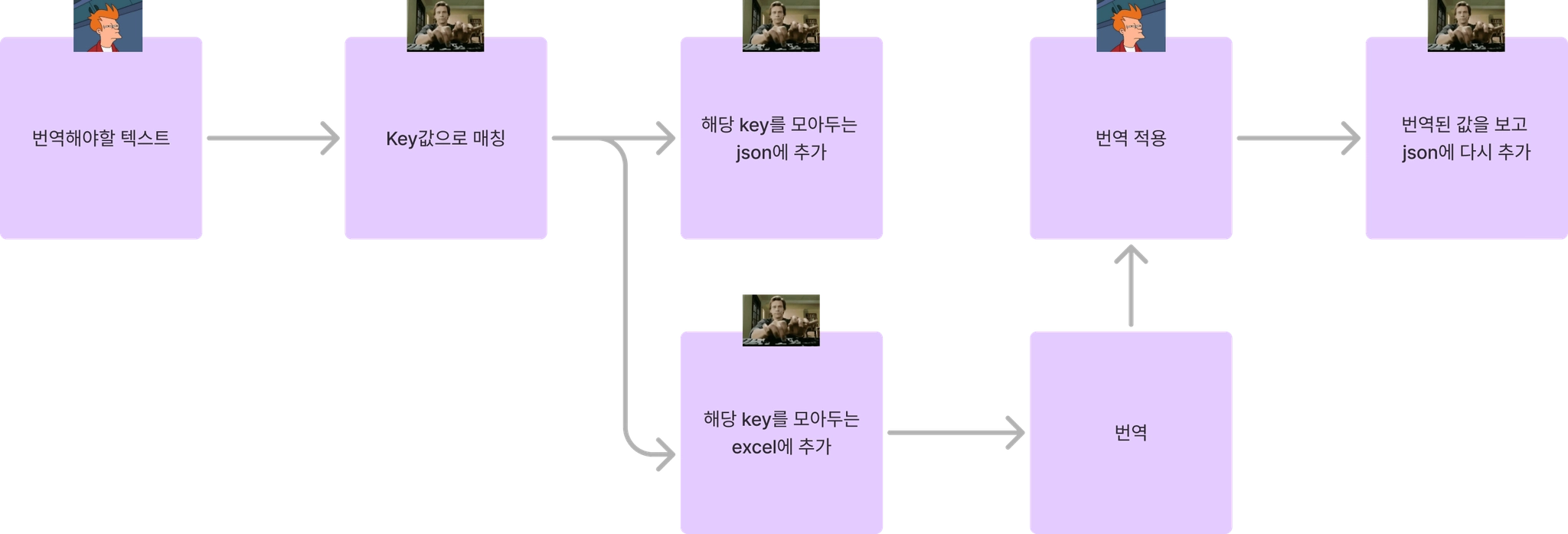
바뀐 번역 프로세스는 다음과 같다.

그림 하나로 표현하면 이런 느낌.
*실제로 1차 번역 소요 시간은 5주 정도가 걸렸고, 2차 번역은 배포까지 2주정도가 걸렸다.
더 나아가서
이글에서 다루진 않았지만, 실제로 위 업무보다 고려해야할게 있긴하다
아직 St, t로 감싸지 못한 문자열들은?
계층화?
key값을 변경하고 싶다면?
1. 아직 $t, t로 감싸지 못한 문자열들
1번 문제는 string을 추출하여 $t, t로 감싸는 함수를 만들었다.
<div>문자열</div> => <div>{{ $t("문자열") }}</div>

const ex = "문자열" => const ex = t("문자열")
이러한 script를 작성해 package.json에 추가해두었다.
import fs from "fs";
import path from "path";

interface ExtractedTranslations {
  [key: string]: string;
}
/**
 * Vue 및 TypeScript 파일에서 한글 문자열을 추출하고 i18n 형식으로 변환하는 클래스
 * @class
 */
export class StringExtractor {
  private translations: ExtractedTranslations = {};
  // 변경 가능한 속성들 정의
  private readonly translatableAttributes = [
    "placeholder",
    "title",
    "label",
    "aria-label",
    "alt",
    "description",
    "text",
    "message",
    "tooltip",
    "caption",
  ];
  constructor(
    private baseDir: string,
    private extensions: string[] = [".vue", ".ts"],
  ) {}
  /**
   * 파일들을 처리하고 한글 문자열을 추출하는 메인 메서드
   * @async
   * @returns {Promise<ExtractedTranslations>} 추출된 번역 객체
   * @throws {Error} 파일 처리 중 오류 발생 시
   */
  async extract() {
    console.log(`검색 시작: ${this.baseDir}`);
    const files = this.getAllFiles(this.baseDir, this.extensions);
    console.log(`총 ${files.length}개 파일 발견`);
    // 백업 생성
    for (const file of files) {
      const backupPath = file + ".bak";
      fs.copyFileSync(file, backupPath);
    }
    try {
      for (const file of files) {
        try {
          console.log(`처리 중: ${path.relative(this.baseDir, file)}`);
          const content = fs.readFileSync(file, "utf-8");
          let updatedContent = content;
          if (file.endsWith(".vue")) {
            updatedContent = this.extractAndReplaceFromVueFile(content, file);
          } else if (file.endsWith(".ts")) {
            updatedContent = this.extractAndReplaceFromTsFile(content, file);
          }
          if (content !== updatedContent) {
            fs.writeFileSync(file, updatedContent, "utf-8");
            console.log(`${path.relative(this.baseDir, file)} 파일 업데이트됨`);
          }
        } catch (error) {
          console.error(`파일 처리 중 오류 발생: ${file}`, error);
        }
      }
      // 성공 시 백업 삭제
      for (const file of files) {
        const backupPath = file + ".bak";
        if (fs.existsSync(backupPath)) {
          fs.unlinkSync(backupPath);
        }
      }
    } catch (error) {
      // 오류 발생 시 백업에서 복원
      console.error("처리 중 오류 발생, 백업에서 복원합니다.", error);
      for (const file of files) {
        const backupPath = file + ".bak";
        if (fs.existsSync(backupPath)) {
          fs.copyFileSync(backupPath, file);
          fs.unlinkSync(backupPath);
        }
      }
      throw error;
    }
    console.log(
      `총 ${Object.keys(this.translations).length}개의 문자열 추출됨`,
    );
    return this.translations;
  }
  /**
   * 지정된 디렉토리에서 대상 확장자를 가진 모든 파일을 재귀적으로 검색
   * @private
   * @param {string} dir - 검색할 디렉토리 경로
   * @param {string[]} extensions - 검색할 파일 확장자 목록
   * @returns {string[]} 발견된 파일 경로 목록
   */
  private getAllFiles(dir: string, extensions: string[]): string[] {
    const entries = fs.readdirSync(dir, { withFileTypes: true });
    let files: string[] = [];
    for (const entry of entries) {
      const fullPath = path.join(dir, entry.name);
      if (entry.isDirectory()) {
        files = [...files, ...this.getAllFiles(fullPath, extensions)];
      } else if (extensions.includes(path.extname(entry.name))) {
        files.push(fullPath);
      }
    }
    return files;
  }
  /**
   * Vue 파일에서 한글 문자열을 추출하고 i18n 형식으로 변환
   * @private
   * @param {string} content - 파일 내용
   * @param {string} filePath - 처리 중인 파일 경로
   * @returns {string} 변환된 파일 내용
   */
  private extractAndReplaceFromVueFile(
    content: string,
    filePath: string,
  ): string {
    let updatedContent = content;
    // <template> 영역 처리
    const templateMatch = content.match(/<template>([\\s\\S]*?)<\\/template>/);
    if (templateMatch) {
      const templateContent = templateMatch[1];
      const updatedTemplateContent = this.replaceTextInTemplate(
        templateContent,
        "$t",
      );
      updatedContent = updatedContent.replace(
        templateContent,
        updatedTemplateContent,
      );
    }
    // <script> 영역 처리
    const scriptMatch = content.match(/<script.*?>([\\s\\S]*?)<\\/script>/);
    if (scriptMatch) {
      const scriptContent = scriptMatch[1];
      const updatedScriptContent = this.replaceText(scriptContent, "t");
      updatedContent = updatedContent.replace(
        scriptContent,
        updatedScriptContent,
      );
    }
    return updatedContent;
  }
  /**
   * TypeScript 파일에서 한글 문자열을 추출하고 i18n 형식으로 변환
   * @private
   * @param {string} content - 파일 내용
   * @param {string} filePath - 처리 중인 파일 경로
   * @returns {string} 변환된 파일 내용
   */
  private extractAndReplaceFromTsFile(
    content: string,
    filePath: string,
  ): string {
    return this.replaceText(content, "t");
  }
  /**
   * Vue 템플릿 내의 텍스트를 i18n 형식으로 변환
   * @private
   * @param {string} content - 템플릿 내용
   * @param {string} wrapper - i18n 래퍼 함수명 (예: "$t")
   * @returns {string} 변환된 템플릿 내용
   */
  private replaceTextInTemplate(content: string, wrapper: string): string {
    let updatedContent = content;
    // 이미 래핑된 텍스트를 감지하는 정규식
    const alreadyWrappedRegex = new RegExp(
      `\\\\b(?:\\\\$?t)\\\\((['"])([\\\\s\\\\S]+?)\\\\1\\\\)`,
      "gm",
    );
    // 이미 래핑된 텍스트를 기록해 배제하는 Set
    const wrappedTexts = new Set<string>();
    content.replace(alreadyWrappedRegex, (match) => {
      wrappedTexts.add(match);
      return match;
    });
    // 일반 텍스트 처리
    const textRegex = />([^<>]*[\\u3131-\\u318E\\uAC00-\\uD7A3]+[^<>]*)</g;
    updatedContent = updatedContent.replace(textRegex, (match, p1) => {
      const text = p1.trim();
      if (
        text &&
        !text.includes("{{") &&
        !wrappedTexts.has(`${wrapper}("${text}")`) &&
        text.length > 1
      ) {
        this.translations[text] = text;
        wrappedTexts.add(`${wrapper}("${text}")`);
        return `>{{ ${wrapper}("${text}") }}<`;
      }
      return match;
    });
    // 속성 처리 - 수정된 부분
    const attrPattern = this.translatableAttributes
      .map(
        (attr) =>
          `(${attr}|:${attr})=["']([^"']*[\\u3131-\\u318E\\uAC00-\\uD7A3]+[^"']*)["']`,
      )
      .join("|");
    const attrRegex = new RegExp(attrPattern, "g");
    updatedContent = updatedContent.replace(attrRegex, (match, ...args) => {
      const groups = args.slice(0, -2).filter(Boolean);
      const attr = groups[0];
      const value = groups[1];
      if (!attr || !value) return match;
      const text = value.trim();
      if (
        text &&
        !text.includes("{{") &&
        !wrappedTexts.has(`${wrapper}("${text}")`)
      ) {
        this.translations[text] = text;
        wrappedTexts.add(`${wrapper}("${text}")`);
        // 속성 이름에서 콜론 제거
        const baseAttr = attr.replace(/^:/, "");
        // 새로운 형식으로 반환
        return `:${baseAttr}="${wrapper}('${text}')"`;
      }
      return match;
    });
    return updatedContent;
  }
  /**
   * 일반 텍스트를 i18n 형식으로 변환
   * @private
   * @param {string} content - 파일 내용
   * @param {string} wrapper - i18n 래퍼 함수명 (예: "t")
   * @returns {string} 변환된 파일 내용
   */
  private replaceText(content: string, wrapper: string): string {
    // 이미 래핑된 텍스트 필터링 (t(...)와 $t(...) 모두 감지)
    const alreadyWrappedRegex = new RegExp(
      `\\\\b(?:\\\\$?t)\\\\((['"]).+?\\\\1\\\\)`,
      "g",
    );
    // 이미 래핑된 텍스트를 기록해 배제하는 Set
    const wrappedTexts = new Set<string>();
    content.replace(alreadyWrappedRegex, (match) => {
      wrappedTexts.add(match);
      return match;
    });
    // 문자열 리터럴 내의 한글 처리
    const regex = /(['"`])([^'"\\n]*[\\u3131-\\u318E\\uAC00-\\uD7A3]+[^'"\\n]*)\\1/g;
    return content.replace(regex, (match, quote, text) => {
      text = text.trim();
      if (
        text &&
        !text.includes("{{") &&
        !text.includes("${") &&
        !wrappedTexts.has(`${wrapper}("${text}")`) &&
        text.length > 1
      ) {
        this.translations[text] = text;
        wrappedTexts.add(`${wrapper}("${text}")`);
        return `${wrapper}("${text}")`;
      }
      return match;
    });
  }
  /**
   * 추출된 번역을 JSON 파일로 저장
   * @param {string} outputPath - 저장할 파일 경로
   * @throws {Error} 파일 저장 중 오류 발생 시
   */
  public saveTranslations(outputPath: string): void {
    fs.writeFileSync(
      outputPath,
      JSON.stringify(this.translations, null, 2),
      "utf-8",
    );
    console.log(`번역이 ${outputPath}에 저장되었습니다.`);
  }
}
추후 코드를 짜다 보니 Lexer를 만들어 구현하는게 더 좋지 않았을까..? 라는 생각이 있었고, 처음 이후에는 쓰이지 않을 코드라 위 글에서는 자세하게 다루지 않았다
2. 계층화?
json의 nested 구조를 통해 계층화를 이룰 수 있는데 이를 테면 아래와 같다
{
  "common": {
	"a": "A",
	"b": "B"
  }
}

// common.a = "A"
// common.b = "B"
이런식으로 key값들을 계층화 할 수 있는데, 내 코드에서는 한국어 텍스트를 그대로 사용하지 않고 key값을 계층화 시켜 하나의 json에서 한눈에 볼 수 있도록 했다
? ? 글에서는 분명 ~ 한국어 key값을 사용하는 방식으로 설명해놓고 왜 이제와서 바꾸냐 ?
원래 내 코드는 계층화 식으로 key를 구성했었고, 기존 key를 전부 바꾸는건 귀찮다고 생각했기 때문이다, 그래서 이후 설명할 3번째 방식에 답이 있다
3. key값을 변경하고 싶다면?
한국어 key값을 변경하고 싶은 경우가 있을것이다, 나 같은 경우에는 excel에서 key값을 바꾼뒤에 missingkey를 찾아 json에는 없지만, value값이 같은 value가 있다면, 해당 key값으로 replace하는 함수를 구현했다
이런식으로 변경된다
// some.vue
<div> {{ $t("관리자 입니다") }} </div>

// ko.json
"admin" : "관리자 입니다"

// -- After yarn i18:update --
// some.vue
<div> {{ $t("admin") }} </div>
문자열 추출 보다 훨씬 쉽게 구현 가능하다 regex 패턴이 $t나 t로 감싼 함수로 찾으면 되기 때문이다.
아까 얘기한 구글의 GMS 프로세스?
Goals-Signals-Metrics (GSM)는 제품의 목표를 설정하고, 성공을 나타내는 신호를 파악한 뒤, 이를 측정 가능한 지표로 변환하는 프로세스입니다.
여기서 목표(Goals)를 정할때 엔지니어링 생산성을 구성하는 다섯 가지 요소(QUANTS)를 고려하는데, 개선된 번역 프로세스에 대입해서 보자면,
번역 프로세스에서는?
코드 품질 (Quality of the code)
원본 문자열을 키로 사용함으로써 키 관리의 복잡성을 줄여 코드의 가독성과 유지보수성을 향상시킵니다. 불필요한 키 지정이 없어져 코드가 더 명료해집니다. 또한 코드와 번역 파일 간의 일관성을 유지하여 버그 발생 가능성을 줄이고, 수동 수정으로 인한 오류를 감소시킵니다.
엔지니어들의 몰입도 (Attention from engineers)
자동화 도구 도입으로 반복적이고 단조로운 작업을 자동화하여 엔지니어들이 핵심 기능 개발에 집중할 수 있습니다. 번역 작업에 소요되는 시간을 줄여 업무 효율성을 높이며, 통합된 엑셀 파일로 번역을 관리하여 협업이 원활해지고 팀원 간의 소통이 향상됩니다.
지적 복잡성 (Intellectual complexity)
번역 키를 계층적으로 조직하여 파일 구조의 복잡성을 감소시킵니다. 키의 위치와 역할을 쉽게 파악할 수 있어 이해도가 높아지며, 불필요한 키를 제거하여 시스템의 단순성을 유지하고 관리 부담을 줄입니다.
박자와 속도 (Tempo and velocity)
엑셀과 JSON 간 자동 변환으로 수작업 시간을 단축하여 번역 프로세스의 속도를 향상시킵니다. 변경 사항이 즉시 반영되어 개발 주기를 빠르게 가져갈 수 있으며, 스캔 기능을 통해 새로운 문자열과 키 변경 사항을 빠르게 감지하고 적용하여 신속한 대응이 가능합니다.
만족도 (Satisfaction)
번역 작업의 부담이 줄어들어 업무 스트레스 감소 및 만족도 증가로 이어집니다. 일관된 키 관리와 자동화로 번역 오류를 최소화하여 최종 사용자들의 만족도를 높입니다.
개선하길 잘한 프로세스라는걸 5가지 요소를 통해 알 수 있었다.
마무리
기획과 개발을 같이하는 잡부이긴 하지만, 그래도 개발에 좀 더 집중을 하고 싶었고, 번역 작업은 수작업이 너무 많이 들어가는 터라 최대한 작업량을 줄이고 싶었다.
다른 회사 친구들은 내부에 화면 기획때 key값까지 정해주는 기획팀이 있다던지, 화면에서 번역 텍스트들만 관리하는 팀이 있다던지, 외부 서비스를 쓰는 회사도 있겠지만..(like Localiz) 내가 할 수 있는건, 열심히 텍스트 노가다를 하는 것이 였다.
하지만 예전처럼 노가다 보단, 좀 더 개발자적인 마인드로 문제를 해결해 보고자 했었고, 단순하게 눈 앞에 놓인 번역 문제가 아닌 유지 보수 관점으로 번역 프로세스를 바라보다 보니, 조금 더 넓은 부분을 바라 볼 수 있었다.
덕분에 여러 script를 구현하고 프로젝트에 돌려보기도 했고, 만든 script를 활용해 해당 프로젝트가아닌 다른 프로젝트에서도 사용하기 편하게 개조하여, 작업량을 대폭 줄이는 경험도 하게 되었다.
📚 참고
- Internationalization (i18n) - Glossary | MDNInternationalization, often shortened to "i18n", is the practice of designing a system in such a way that it can easily be adapted for different target audiences, that may vary in region, language, or culture.
developer.mozilla.org
- Intl - JavaScript | MDNThe Intl namespace object contains several constructors as well as functionality common to the internationalization constructors and other language sensitive functions. Collectively, they comprise the ECMAScript Internationalization API, which provides language sensitive string comparison, number formatting, date and time formatting, and more.
https://userpilot.com/blog/goals-signals-metrics/#What-is-the-goals-signals-metrics-process?
- GitHub - i18next/i18next-parser: Parse your code to extract translation keys/values and manage your catalog filesParse your code to extract translation keys/values and manage your catalog files - i18next/i18next-parser
github.com
# 더 읽어보기